
|
How to Link POTCO Accounts - PCs
Connecting POTCO accounts for family usage (linking accounts)
As of June 2, 2009, the ability to switch between accounts and play was removed from the game. Parents can manage their kids pirate accounts, and arrange payment through one main account by linking them together. One other perk I have noticed is it seems to be that if the main account has test access, so will the linked accounts. The main account has some control over the linked accounts, chat features, etc. This "Guide" is to reflect how to link a player accounts. Requirements: 2 Valid working pirate accounts. ( One must be a primary account, and not linked to any other accounts). There are screenshots of the most involved screens below for reference. --------------------------------- 1. Proceed to the Official Pirates of the Carribean Online website. 2. Login to website using your pirates account to be considered the "Primary" account (ie the Parents account). 3. Click on Account Services Menu (on left side) 4. Click Manage Account. 5. Click "Link An Account" on lower left. (Picture 1, #1) (If "Link An Account" button does not exist the account is NOT a primary account (or is under some form of parental controls). 6. Input Login information for the second account (3rd, 4th, etc), or account to be linked and click "Login" (Picture 2) 7. There should be some acknowledgement, and return you back to the "Manage Account" screen (Picture 1). 8. You should now notice the linked account persons name in top left. (Picture 1, #2) 9. Logout of account services (or simply close webpage). Picture 1 http://www.piratesonlineforums.com/g...accounts-1.jpg Picture 2 http://www.piratesonlineforums.com/g...accounts-2.jpg Running multiple accounts on one computer Using shared accounts one can of course play more than one pirate on more than one computer, but how might one play two pirates on the game computer? NOTE: For MAC Computers - Proceed to read this thread: How To Run Two Accounts On A MAC (Click Here)- once you have done the above steps to create / link accounts Requirements: 2 valid "Pirates of the Caribbean Online" accounts. System capable of running the game twice (in two separate windows) Turning down video settings/options to thier lowest settings (F7) is recommended to accomodate two copies of the game in the same environment. 1. Start up POTCO, and login on the first of the two accounts. 2. If not already playing in a "Window", press "F7" and click "Fullscreen" button to change to window mode. 3. Press Ctrl+Alt+Del and select "Task Manager", this will activate Windows Task Manager. 4. Under Processes tab, locate, and select Launcher1.exe and click on End Process. Click Yes in confirmation window then close the Windows Task Manager window. (Picture 4) 5. Leaving original POTCO window open, Start up POTCO again, and login on your second account. 6. Arrange the now two POTCO windows on your screen to easily navigate/control both pirates. (Picture 5) Picture 4* (click for bigger picture) 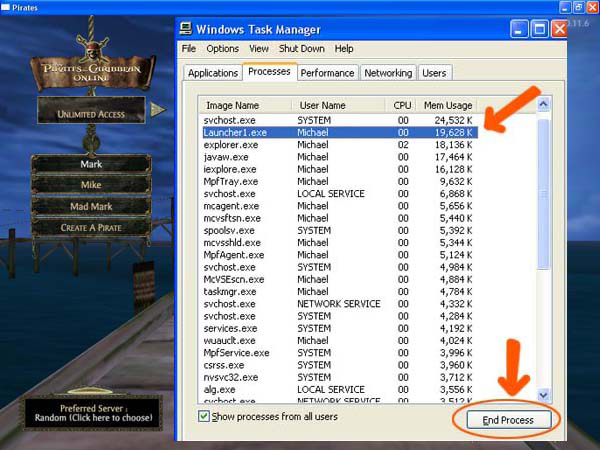 Picture 5* (click for bigger picture) 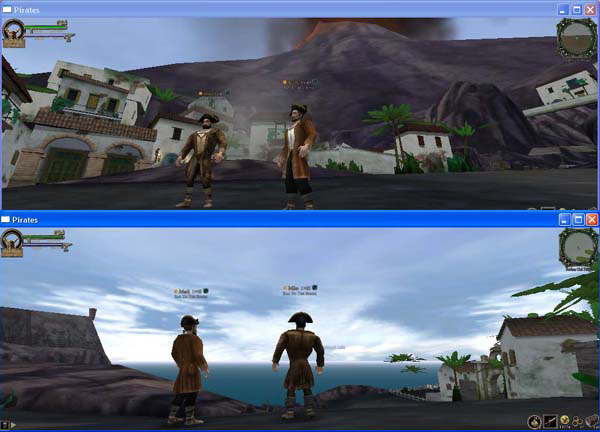 *Special thanks to Ironhawk for the images 4 & 5 ;) |
Quote:
|
Gosh, I have to try this. I would be nice if both me and my husband did not have to pay a subscription fee to play.
|
Quote:
I just created a new account to see, and it being a basic account has the "LINK AN ACCOUNT" button on it just like my screenshot, so im not sure why you dont see it. May there be some form of parental controls on the account? Ok, I checked my account that is linked to my primary account. If YOUR account is already linked to a PRIMARY account, then you cannot link any accounts other accounts to your (non-primary) account. So if you dont have a "Link An Account" button, I would say your account is already linked to someone elses (perhaps a parent or spouses). Do you see more than one "Family Name" referenced (ie Picture 1 #2)??? (going to update the requirements in the "guide" with this information). |
Great news!!! I'll try this later.. (bad internet speed before 8 PM :()
|
You can also link multiple paid and free accounts together.
My wife and I have our two paid accounts, plus three unpaid accounts, linked together in one big happy bundle. The unpaids are for our two kids, plus an extra one I use when I play two pirates on the same machine. |
What do you do when you play with 2 pirates together?...
|
Would this work with TT as well? I remember me an my bro had this problem occasionlly as well.
|
great! need this almost finish my fourth pirate. this will keep me playin . thx f the post
|
Quote:
|
Do you know if you can do this with 2 unlimitted players?
|
have the link accounts done, one is unlimited other is basic. i'm assuming if u want the new account unlimited u have to swicth it to be the primary or pay for 2 accounts. due to the limited number of pirates (4) that we are allow per account. is this correct???? or is there a way to have unlimited on both.
|
Quote:
Quote:
Quote:
You can link paid accounts as well, yes. See below.. Quote:
I have 3 accounts linked, 2 paid, 1 basic. I can access any of the "10" pirates the 3 accounts has to offer (4 per paid, 2 per basic), from any of the three accounts. The basic pirate, can switch to the paid accounts pirates list, and play an unlimited pirate, as an unlimited pirate. I have not tried it, but I assume, that if you are on the paid account, switch to the basic accounts pirates and play one of them, that despite your paid account, you would have to play the basic pirates as a basic account. In summary, the way I understand it, is that the limitations of your pirate (basic vs unlimited), is controlled by the account that the pirate is attached directly to. So a basic account accessing and playing a paid accounts pirates, can play them as a paid account, if they play thier own pirates, they are basic pirates, and on the flipside, if a paid account plays the basic accounts pirates, they would be in basic mode as well. |
DUDE sweet! Watch me go crazy on unlimited stuff!
|
aye that what i found was if u switch to the basic account ur in basic mode. need more pirates on my unlimited account 4 not enough. lol workin on last pirate.
|
do you create the pirate to be played on the second computer through the basic account or the master account? Also, does the linked account get a full screen and access to all the levels?
|
This gives you access to playing two characters at the same time off your unlimited account. So that means you need two characters at least on the unlimited account, and yes it is full screen play as a normal unlimited account. If you wanted , guess you could play two off the basic account as well, which I assume would be the little window.
A little tidbit - Doing this is almost as good as the undead bug use to be. Though it could also be done with just any other account, having a person in a crew like tormenta, saves boat trips. Also cuts out the crew member from jumping spawns if you are under its control, haha. To get close to full rep on two molusk, can be done approximately three times before you need to go get smoke bombs again. |
I just did it!!! thank you!!! :)
|
wow great guide :)
|
I did this about a week or so ago after having one unlimited account and creating 2 basic accounts for the children. The children got frustrated not being able to level up much after level 13 and not having access to all the weapons and quests.
I linked all 3 accounts together and since I have 4 PC's in my house we can all play together at once and unlimited character! Only paying for one and using the other pirates you can create under the unlimited account! This is GREAT! |
Ok so what i am hearing but prob wrong,
When you link an unlimited account and a basic account Does the basic account get unlimited as well when logged on from the unlimited account I am not an expert at this lol |
Quote:
If the pirate is on an unlimited account, it plays as unlimited. If the pirate is on a basic account, it plays as basic. So if you login on basic account, you can switch to the linked unlimited account, and play one of its 4 pirates as unlimited. The 2 basic pirates on the basic account remain basic. If you login on the unlimited account, you can access your 4 pirates as normal, and you can switch the basic account, and play either of the 2 basic pirates (as basic). |
how do you get to the parental controles cause i dont see a link account button and its my primary account and it isnt links so idk what it is so i bet it is parental controles
|
It has been reported, that if your account was created as a minor, even if its primary account, parental controls cannot be changed on it without linking it to another master account that was created as an adult. I do not know if this is correct or not.
I know one member had to create a new account, and have POTCO transfer his pirates in order to remove parental controls from his account. |
Quote:
My scenario: Account A: created by my son with his approximate age/year of birth. Account B: created by my son with his approximate age/year of birth, from a game card. (Unlimited 90 days.) Account C: created by me after reading forum's description of open chat. Used some random adult age (younger than me, older than my son.) Linked the "parental controls" of account B to C using a throw-away e-mail address. Apparently, account A is Disney's "account of record" as it now has that association locked, but logging into the website as account C does not let me change the settings for account B for unlimited chat (but does for everything else.) WARNING: Parental control linking is a one-shot deal. If you spell the e-mail address wrong, you are out of luck. Changing or correcting the linked account's e-mail address does not help. Resetting a throw-away e-mail address does not help. WORK-AROUND: Link the accounts. Log in under account D and arrow left to get to the unlimited pirates. Throw away account D after 7 days and create (and link) a new account D so the unlimited can be played in full screen. Residual problems: Once you have [ ] and [+] open chat, messages still do not go through about 20% of the time. If someone you are talking to does not have open chat, they will NOT hear you at all if you don't turn on the [+] symbol. (Sometimes, guild messages sneak through inexplicably. But never local, or crew.) Whispers sent without [+] will not go through to them, either. Also note: there is never an indication that a message didn't go through. If a message you are sending has an objectionable phrase, the speed-chat will make you press ENTER twice (with nothing highlighted in red) then NOT SEND IT. Other times, it will not require that you press it twice, it just won't send it. Other times it will send it, with objectionable words and phrases intact, with [ ], to minors. There is no rhyme or reason for when it work or when it fails. It does not tell you, when someone can't hear you. It does not tell them, that you tried to say something. It also does not consistently quash the [ ] messages to minors. (Randomly, yes; consistently, no.) One character messages go through, but never should. |
Ok I have to ask... what is "linking an account?" I c that a lot
I c it and hear a lot about it but I just wonder what is "linking" an account?
Thanks |
Quote:
https://apps.pirates.go.com/pirates/...=manageAccount Parental controls: http://apps.pirates.go.com/pirates/v...trols_faq.html |
Ok thanks. That leads to my next question. What does the "+" sign
mean in chat? Do kids have to use the "+" or adults? what difference does it make>? Just curious.
|
OMW- can you only do two? or what..cause i have ALOT of pirates xD
lol (JAG,E.D.M.) J<>J Faith Guide to the Unknown "Why so serious?"- R.I.P. Heath A. Ledger |
Quote:
People 13 and over making comments with [ ] instead of [+], are not heard at all, by those 12 and under. With [ ], there is no "spell check" so you can type freely - even numbers. With [+], normal "speed chat" is enabled, with offensive words and misspellings replaced with "arrr" and lines with offensive phrases are eliminated. |
Is it possible to transfer a character from a linked account to another? Or would the other account owners need to make new characters?
|
Eureka! Took me all night but i think i did it. I had no link account button and so had to create numerous accounts and figure it all out, thanks for the info on parental controls. :) All this effort just to play two pirates at once *bangs head on desk* lol it's gone 4am...i'm exhausted.
|
I linked a basic account to my paid. I am using two pc's one next to the other. I use the left one to sail with and the right one to shoot the cannon. The benefit I see doing this is it is easier to upgrade your cannon shooting cause now you control where the ship goes. I like getting behind the target ship and shooting the rear of it. I also have done the bit where the second player sits on the remote island so I can tp to it and save the trip. Or even have the second player sit at kingshead and I go and fight the navy soldiers.
The hard part is makeing them both fight on a flag ship. |
Quote:
For those flag ships? I use staff on both my pirates. Click "BOARD", land on enemy ship, hit F6 on both computers (select Staff), hit "3" on both computers (select Wither), and start blasting wither with both.. hehe |
I haven't got high enough for staff yet on either but I did try and use them both on two cannons one on each side. (The person sailing did know what I was doing)
I can say that is harder than trying to make two pirates fight as you are trying to make them both aim at the same target. I do wonder if a left handed mouse might make it easier or even a standard mouse that can go either way. I like using my cordless mice that have a curved side for the thumb. |
Quote:
|
Awsome Mate
I emailed Mickey (before signing up for unlimited) asking this very thing. I now know how to do it. Thanks so much. Can't wait to play online with my kids.
|
i dont understand well im trying to but dont know how and this is confusing lol
|
Hi everyone...the first post stated that linked account members have access to all pirates. But there is a lock feature to inhibit the use of the paid member's pirates. I tried it and it doesn't work. Anyone have any luck getting this feature to work?
TIA |
Quote:
It does not prohibit anyone from playing the pirates from linked/member accounts. What it DOES do is prohibit them from being deleted from any other account. It will appear to grant the option, but not be successful unless it is the account that the pirate belongs to. |
I definitely don't have any kind of parental controls on any of my accounts, nor are they linked to anything at all. But i don't have a link account button.
|
Thanks Zep for posting this!
|
Wow! great guide. i might try this later! thanks!
|
How to run POTCO twice on same computer With less lag
this is more of an addition to this guide
http://www.piratesonlineforums.com/f...ead.php?t=7605 if you want to run both programs at the same time with less lag minimize one of the windows then use the other window DO NOT have both open at the same time or you will lag out both of your windows (run both on the lowest graphics settings) if you do everything right not only can you syncronize zombie dancing (i know some of my guild mates have screenies of this) you can have your level 40 help your lower level characters (like stealing your war frigate) By minimizing the window you set the program to a background service and background services tend to use up less resources than programs that are being used at the moment and show up on the monitor I'm not saying this can work for you as i do not know what type of hardware you have but if your computer is capable enough this is how you can use both windows with less lag (i do this every day now no lag at all) also you may not need more ram your CPU plays a vital part in this i have a quad-core so each window gets two cores each time i minimize the other if they share the same cores i know to expect lag |
Note: As this thread (see post #1) is the current standard for those trying to run two accounts of POTCO on a computer, the above mentioned thread (http://www.piratesonlineforums.com/f...ead.php?t=7605 ) has been Closed and this thread will be the discussion thread for information / advice on two POTCO accounts :D
|
OK what if My friend and i want to link accounts but he is the only one who has the ability to link to other accounts (the link account button comes up for him not me) but he is basic. if i link my account to his will i still be unlimited and he become unlimited too? or does the main person have to be unlimited? thanks ahead of time
|
Quote:
|
ok thanks for the info ;)
|
glad to of been some help Chris lol
|
I want to transfer a character from a diffrent account, what do i do?
|
Quote:
Quote:
Quote:
|
I've had linked accounts for about 6 months now, one unlimited and one basic. I have 4 pirates on the unlimited account, but 2 of the pirates were created while signed in on one account and the other 2 were created while signed in the other account. Because of this, if you go to DxD and search for Davy Redfoote you will be able to see him and 1 of my other pirates named Jade. If you search for Ace Vader, you will be able to see him and another 1 of my pirates, Sir Opeth.
My question is, How can i get all 4 linked on DxD? I'm pretty sure i've searched some pirates and seen like 5 or 6 of their other pirates when i clicked the little arrow next to their name. More than the standard 4 so i figure there must be a way to link them on DxD. |
Quote:
I would guess it associates the pirate with whatever DName created/setup the pirate (regardless of which account it resides on). May not be anyway to resolve that, I dont think there is anyway to link DxD accounts. |
Quote:
Quote:
Quote:
|
Quote:
|
Quote:
|
it might be useful to tell how to play both accounts on one computer using a mac. if you do add this, i can provide the info and screenshots. =] great post!
|
this worked for me before, but now when i try it, when im logging into my account the second time (after i ended launcher1.exe) it always says "failed to log in and retrieve your pirates. restart and try again." and when i go back to my already logged in pirate, it has crashed- "you have been diconnected because someone else just logged in using your account on another computer" HELP! :psmiley27:
|
You have to log in to the separate accounts - only one session per login name. You linked two (or more) accounts, so don't only log in from one.
|
Can someone post how to do this on a mac?
|
Quote:
EDIT: I went ahead and posted it on here. Mods- if it needs to go elsewhere, that's fine. :) *Mods Note* The article is excellent and should have its own thread - MAC Users can click the link below once they have created their second basic account to run the two of them on a MAC :) http://www.piratesonlineforums.com/f...ad.php?t=10759 |
An excellent Tutorial - and is now in its own Thread :D Good Job!
To review Jasons Tutorial for running Multiple Pirates on a MAC - Click Here :D I also added you new Tutorial to the Master Guide created by Edward (which he lists all major guides). Feel free to take a look at that as well for all guides collected in on location (Click Here) |
Quote:
|
So now that Disney has become money hungry corporation is there anyway to be able to play on one account, two different computers at the same time? Like you used to be able to when they allowed you to switch between linked accounts before June 2, 2009?
|
I think when you try the first pirate in crashes. Which is kinda odd, seeing as how the first pirate was in. I would think the second pirate should get the "Sorry but another of your pirates is attempting to log on." At least that's the message I got when I accidentally logged 2 on the same ID.
|
Umm can i have that link to the Click "Link An Account" on lower left?
|
| All times are GMT. The time now is 03:04 AM. |
Powered by vBulletin® Version 3.8.11
Copyright ©2000 - 2026, vBulletin Solutions Inc.