POTC Fansite Home POTCF Forums POTCF Gallery Blogs POTCF Arr!cade POTCF User Pages Register! Casino!

Go Back   Pirates of the Caribbean Online Fansite & Forums > Other > Creative Coffers > Creative Coffers Archive
Blogs FAQDonate Calendar Arcade Mark Forums Read

Creative Coffers Archive Creative Coffers Archive Forum

Old Transparent Avatar?

Login or Register now to see less ads.


Thread Tools Display Modes
  #1  
Old 08-17-2009, 11:57 PM
Dr. Zeppers's Avatar
Dr. Zeppers Dr. Zeppers is offline
Drunken Pirate Master
Dr. Zeppers's Primary Pirate Info

Join Date: Feb 2008
Location: Doing that voodoo that I do so well..
Posts: 4,162
My Mood: Piraty
Dr. Zeppers must be getting help from Tia Dalma to get this farDr. Zeppers must be getting help from Tia Dalma to get this farDr. Zeppers must be getting help from Tia Dalma to get this farDr. Zeppers must be getting help from Tia Dalma to get this farDr. Zeppers must be getting help from Tia Dalma to get this farDr. Zeppers must be getting help from Tia Dalma to get this far
Quote:
Originally Posted by Aliese View Post
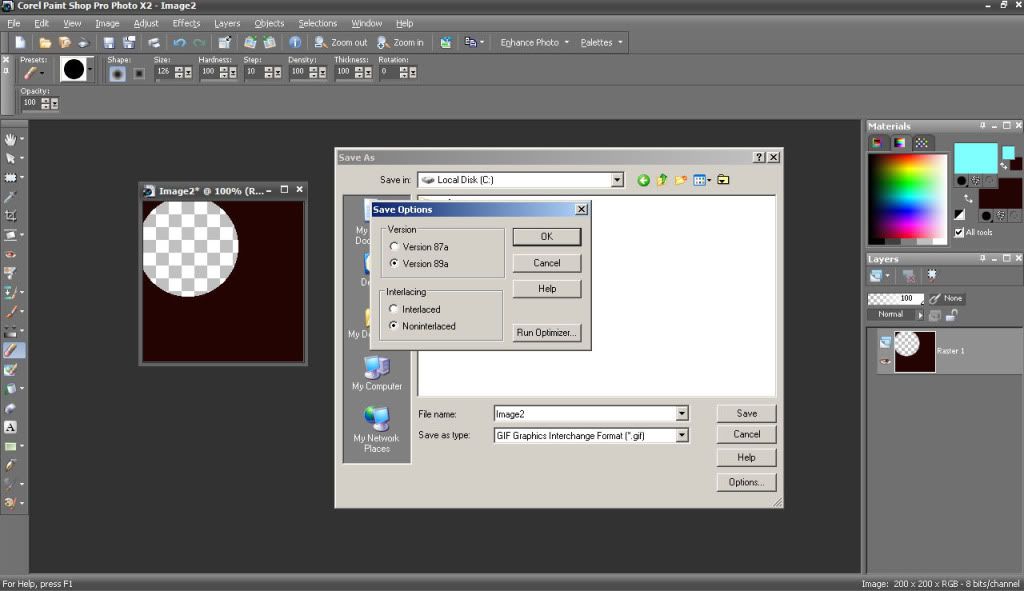
I'm not familiar with GIMP, but in Paint Shop Pro I have to run the optimizer while saving to get a transparency to stick. So, I "Save As", click "Options", and then click "Run Optimizer". If everything looks right, then I save in the optimizer.

There may be an easier way to do it, but I don't deal with transparencies all that often so it's not a big deal to me to take a couple of extra steps.
Hmmm I think your talking about the Animation Shop utility distributed with PSP, unless they integrated it in one of the last few versions.
It has the optimizer you speak of, never seen it actually in PSP, just trying to help in case someone gets confused looking.

In PSP 10 on down (dont know about the latest)
GIF is limited to 256 colors and PSP requires a color to be set as transparent, as there is no 'true' transparency in a GIF, it simply instructs viewers to not display the one color. There is should be no optimizer required for single frame images, as they are used to remove extra repeated data in a multiframed (animated) GIF.

PNG supports 16 million colors, including transparency, PSP will save any transparency in the image automatically upon saving a PNG file.

I would be willing to bet the OPs issue is the board resizing their image and thereby losing the transparency as Jack mentioned. Uploading it at 64x64 or smaller should resolve the problem.
__________________
  #2  
Old 08-18-2009, 12:14 AM
Aliese's Avatar
Aliese Aliese is offline
AKA Piper/Sawyer/Laurel
Aliese's Primary Pirate Info

Join Date: Apr 2008
Location: With My Beardies
Posts: 1,120
My Mood: Nerdy
Aliese is a buccaneerAliese is a buccaneerAliese is a buccaneer
Quote:
Originally Posted by Dr. Zeppers View Post
Hmmm I think your talking about the Animation Shop utility distributed with PSP, unless they integrated it in one of the last few versions.
It has the optimizer you speak of, never seen it actually in PSP, just trying to help in case someone gets confused looking.

In PSP 10 on down (dont know about the latest)
GIF is limited to 256 colors and PSP requires a color to be set as transparent, as there is no 'true' transparency in a GIF, it simply instructs viewers to not display the one color. There is should be no optimizer required for single frame images, as they are used to remove extra repeated data in a multiframed (animated) GIF.
I do have Animation Shop on my computer, but I'm working in PSP (I have versions 7-12 [er, "X2"]).

ETA: Here's a screenie:
Click the image to view the full version

It never occurred to me that it might be a part of another program (if it's not on yours, that must be the case), but in any case, it's there on mine.
 

Thread Tools
Display Modes

Posting Rules
You may not post new threads
You may not post replies
You may not post attachments
You may not edit your posts

BB code is On
Smilies are On
[IMG] code is On
HTML code is Off

Forum Jump


All times are GMT. The time now is 12:32 AM.

POF on Facebook

Powered by vBulletin® Version 3.8.11
Copyright ©2000 - 2026, vBulletin Solutions Inc.